Contents
01 The Opportunity 02 Role & Context 03 Approach 04 Results 05 Takeaways Get in Touch
Microsoft Azure · Fluent UI Migration · Learning Day POC

Azure Pricing Calculator

Fluent UI Modernization POC

A self-initiated proof of concept to modernize the Azure Pricing Calculator's UI by migrating from a deprecated component library to Fluent UI—completed in ~3 hours during an internal learning day.

Visit Azure Pricing Calculator
⏱️ ~3 Hour Timebox
🎯 Self-Initiated
✅ Proven Feasibility
Scroll to explore
01

The Problem / Opportunity

The application was relying on an old, deprecated component library, creating several risks and limitations.

🔒

Security & Accessibility Debt

Staying on the old library meant ongoing, manual upkeep of vulnerabilities and accessibility issues that would otherwise be handled by the maintained Fluent UI library.

🎨

Visual Inconsistency

The tool looked and felt outdated compared to modern Azure experiences, creating a disjointed user experience across the Microsoft ecosystem.

🐢

Reduced Velocity

New features were shipping quarterly, but lack of Fluent UI support added friction and rework—slowing down delivery and increasing complexity.

⚠️

Ownership Risk

The deprecated library lacked active maintenance, while Fluent UI is supported by a dedicated Microsoft team with regular updates and long-term support.

This presented an opportunity to reduce risk, increase velocity, and modernize UX without disrupting functionality.

02

Role & Context

Frontend Engineer (Sole Contributor)

The Azure Pricing Calculator is a widely used tool that helps customers estimate costs across Azure services. This project was a self-initiated proof of concept to modernize the application's UI—completed during an internal learning day in approximately 3 hours.

Scope

UX/UI Modernization POC
Non-Roadmap Initiative
Learning Day Project
03

Approach & Execution

I intentionally chose an incremental, low-risk migration strategy. Any UI change could introduce regressions, so the goal was to maximize impact while minimizing surface area.

Why Incremental?

Rather than a risky full rewrite, I focused on targeted component swaps that would deliver immediate value while proving the migration path was safe and viable.

What I Targeted

Focused on form elements, which account for ~70% of the Pricing Calculator UI. Swapping these to Fluent UI:

  • Immediately improved accessibility (WCAG-aligned)
  • Modernized most of the experience visually
  • Reduced the need for custom accessibility fixes

Quality & Safety

  • The application already had ~94% unit test coverage
  • Changes were validated by the existing test suite
  • The build would fail on regressions, providing fast feedback
  • Future roadmap: add E2E tests for full interaction coverage

Why This Worked in ~3 Hours

At the time, modernization was estimated to take several months of planning and execution. This POC demonstrated that:

✓ Fluent UI components could be adopted component-by-component
✓ No rewrite was required
✓ Visual modernization could be achieved without breaking functionality
✓ Existing tests were sufficient to move quickly and safely

The work reframed the conversation from "Is this risky?" to "How fast can we do this?"

04

Results & Wins

✅ Proven feasibility of incremental Fluent UI adoption
✅ Reduced long-term security and accessibility ownership
✅ Modernized the majority of the UI by upgrading form controls
✅ Preserved application stability through existing tests
✅ Established a clear, low-risk migration path
✅ Changed perception of cost and effort for future modernization
~70% of UI modernized via form element migration
94% test coverage validated the changes
~3hrs total effort for working POC

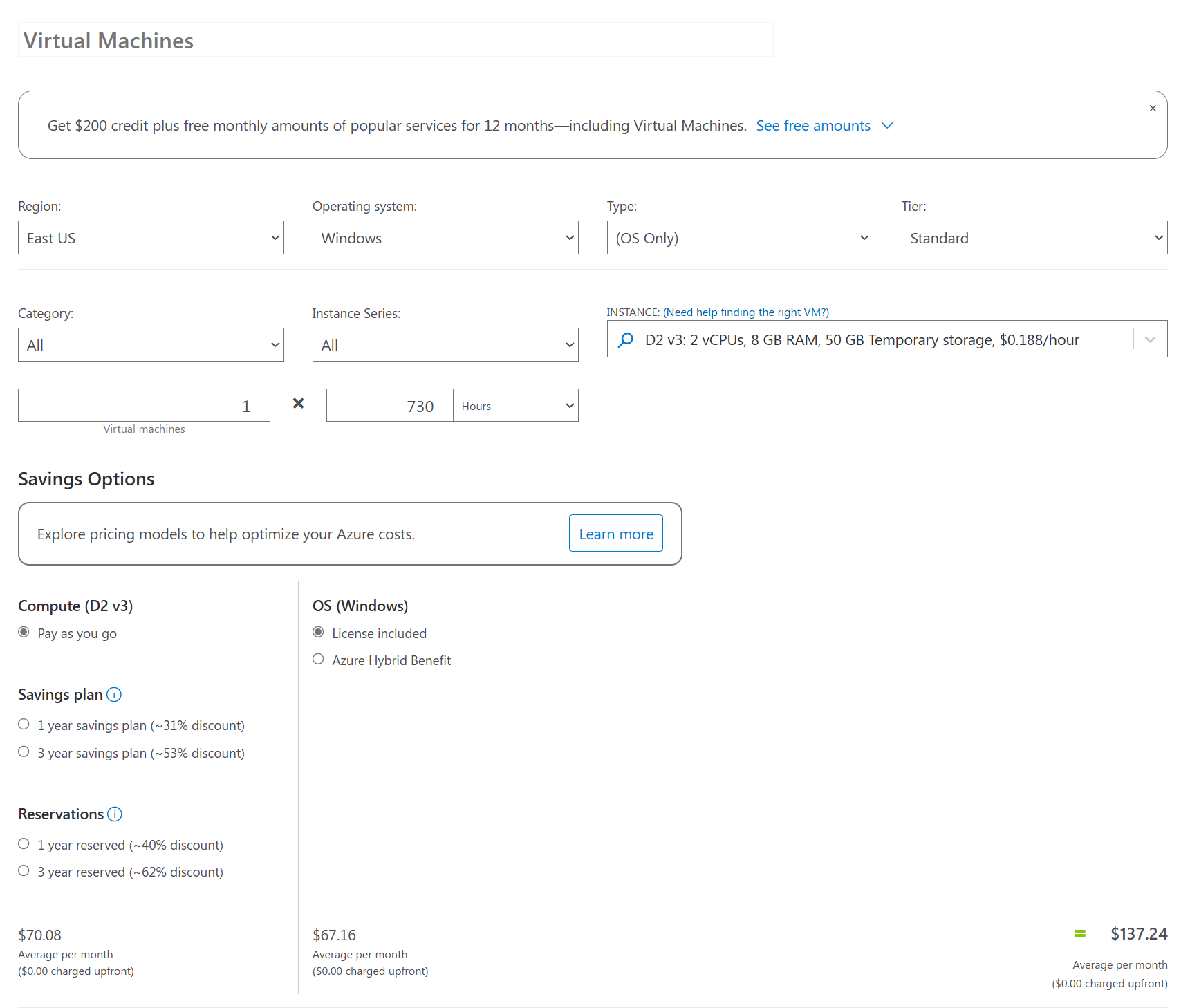
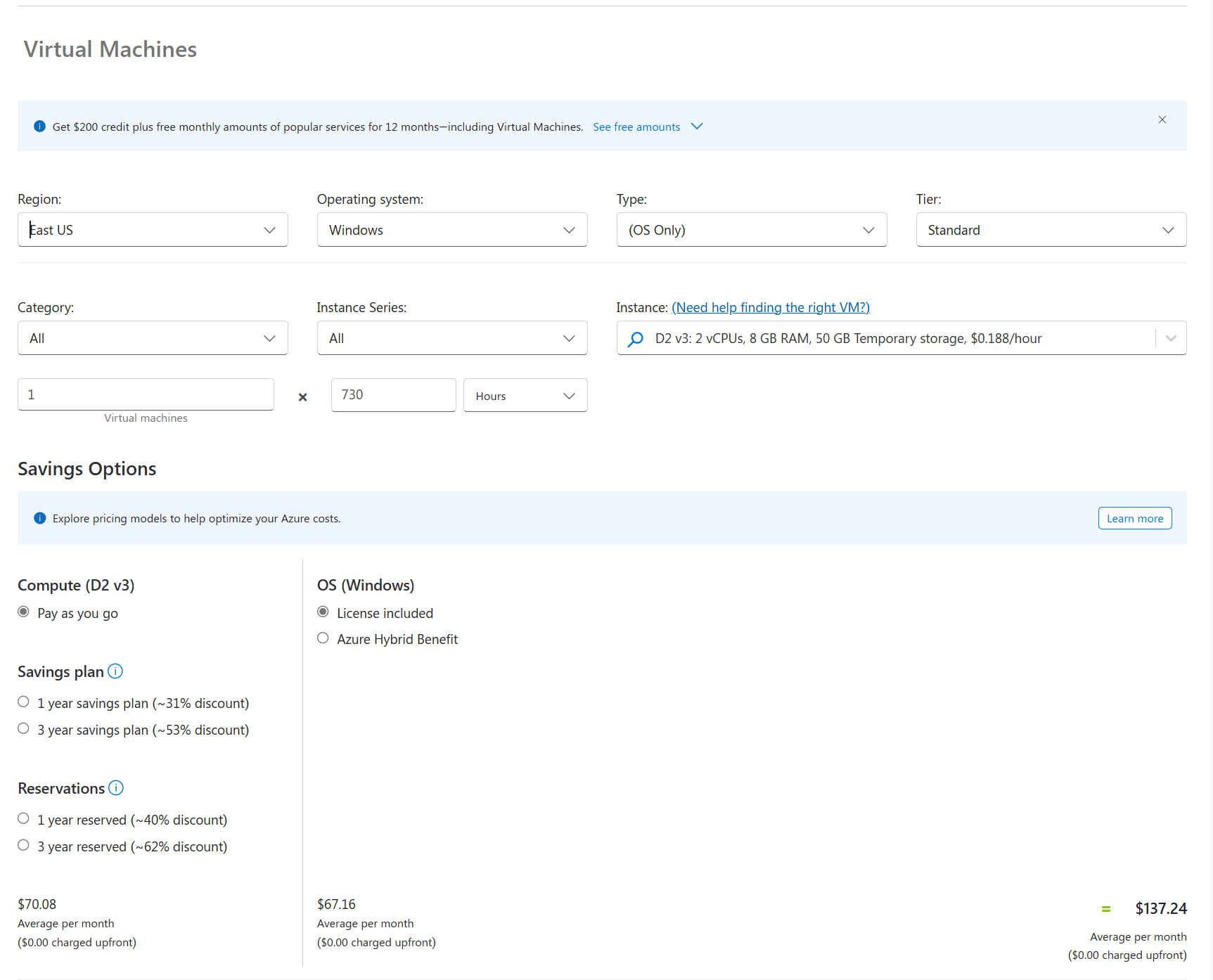
The Transformation

Swapping deprecated components for Fluent UI modernized the entire experience

Before
Pricing Calculator before Fluent UI migration - deprecated component library
  • Deprecated component library
  • Outdated visual styling
  • Manual accessibility fixes required
  • Inconsistent with Azure ecosystem
After
Pricing Calculator after Fluent UI migration - modern components
  • Fluent UI components
  • Modern, cohesive design
  • Built-in WCAG compliance
  • Consistent Azure experience
05

Key Takeaways

📈

Incremental Beats Big Rewrites

Incremental modernization scales better than big rewrites. By targeting high-impact areas first, you can prove value quickly and build momentum for larger changes.

🧪

Test Coverage Enables Speed

High test coverage enables speed and confidence. The existing 94% coverage meant I could move fast knowing regressions would be caught immediately.

🎨

Design Systems Improve Velocity

Design systems improve delivery velocity—not just visuals. Fluent UI's accessibility and consistency out of the box reduced custom work significantly.

💡

POCs Unblock Tech Debt

POCs are powerful tools for unblocking long-standing technical debt. Sometimes the best way to get something on the roadmap is to prove it's already possible.

🚀

Proactive Initiative Matters

Proactive initiative can change team and stakeholder assumptions. What was seen as a months-long effort became a clear, achievable path forward.

Let's build something great together

Available for frontend engineering leadership roles where I can shape user experiences at scale.